 LogSure
iPhone, Mac and terminal
The native apps talk to your server with a device token. You make one in the web console, and remove it there to sign the device out at once.
Pairing a device
- In the web console, open Settings › Devices, give the device a name such as "iPhone" or "Terminal", and choose Make a code.
- The page shows a QR code and, under it, a link like
logsure://logsure.example.com/cc_…. It is shown once, so use it before leaving the page. - Scan the code with the iPhone app, click or paste the link on the Mac, or paste it into
logsure loginin the terminal.
iPhone and Mac
Every app's dashboards, events and funnels, errors with their triage, traces, logs and services, the Lab's experiments, the inbox of feedback, bug reports and messages, and the waitlists, in SwiftUI. Owners and admins also run the team, app settings and feature switches. The token is kept in the Keychain.

The Mac app shows the same in a native window: a sidebar with the overview, the inbox, the waitlist, Settings and every app's dashboard; the inbox with the list and the selected request side by side; the time window in the toolbar. It looks for new requests every minute, posts a notification for each one, and shows the open count on the Dock icon. Keyboard shortcuts cover the inbox: ⌘1 to ⌘4 for the lists, ⇧⌘R to resolve, ⌥⌘R to reply by email, ⇧⌘E to export.
Build from source
The apps are not in the App Store yet. Build them with Xcode 26 or newer and XcodeGen:
git clone https://github.com/logsure/ios && cd ios
xcodegen generate
open LogSure.xcodeproj
The LogSure scheme is the iPhone app and LogSureMac the Mac app. Set your own team and bundle identifier in project.yml before running on a device. The API client is generated at build time from the contract by Apple's Swift OpenAPI Generator; the first build asks you to trust its plugin. The README has the details.
Terminal
A keyboard-driven console in Rust: browse every app's analytics, funnels, errors, traces, logs, services and experiments, the inbox and the waitlists, resolve requests and add notes, across several servers.
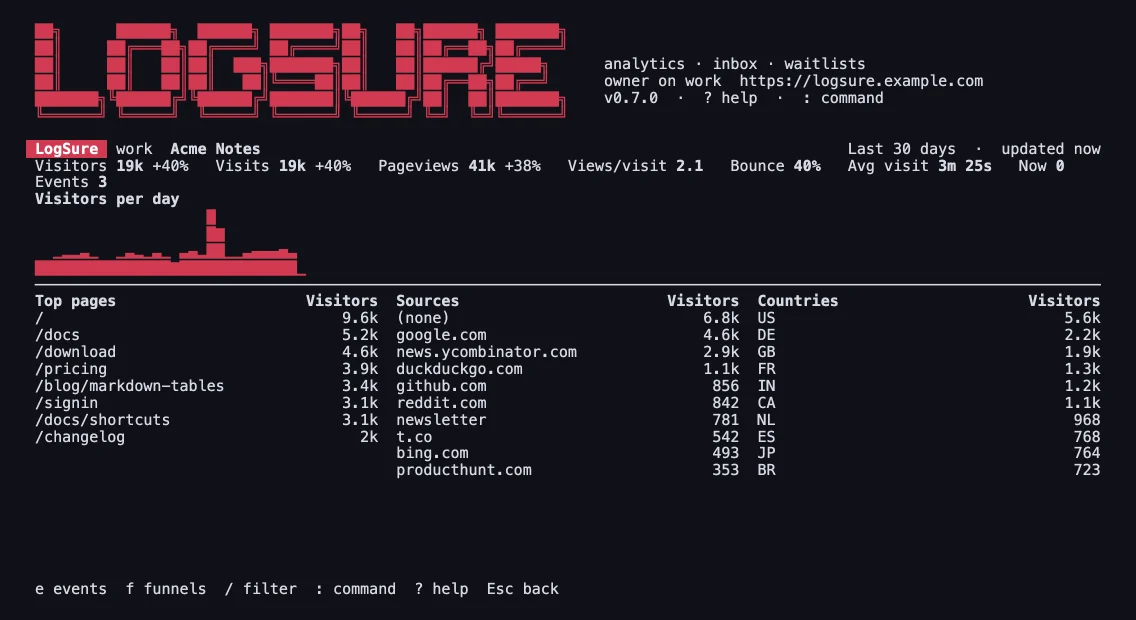
Install
With Homebrew on macOS and Linux, from the repository's own tap:
brew tap logsure/terminal https://github.com/logsure/terminal
brew trust logsure/terminal
brew install logsure
It builds from source, so the first install takes a few minutes. Or with Cargo (Rust 1.88 or newer):
cargo install --git https://github.com/logsure/terminalThe binary is logsure; the server's is logsure-server, so both can be installed side by side.
Use
logsure login            # paste the logsure://… code from Settings › Devices
logsure # the full-screen console| Command | View |
|---|---|
:apps | Every app: visitors, pageviews, change, visitors now and a trend |
:app <id> | One app's dashboard, laid out as you saved it |
:dash [name] | Your saved dashboards for the app, or one of them |
:events [app] | Custom events with visitors, counts, conversion and value |
:funnels [app] | Saved funnels; Enter shows each step |
:errors [app] [status] | Error issues; Enter shows one with its frames, occurrences and notes |
:traces [app] | Traces; Enter shows the waterfall, and a span's attributes, events and logs |
:logs [app] [level] [words] | Logs from a level up; f follows new ones |
:services [app] | Each service's rate, error rate and p50, p95 and p99 |
:lab [app] | Experiments and their results; admins start and stop them |
:features [app] | Feature switches; admins change them |
:inbox [kind] [status] | Feedback, bug reports and messages, e.g. :inbox bug open |
:waitlist [list] [status] | Signups, with every list's counts |
:range <window> | The time window: 7d, lastmonth, 2026-09, 2026-09-01..2026-09-15 and more |
:ctx [name] | List the servers, or switch to one |
For scripts, one-shot subcommands answer once and exit, and --json prints the server's answer as it came:
logsure apps --range 30d
logsure inbox --kind bug --status active --json
Tokens live in the OS keychain, never in a file. For headless use, LOGSURE_URL and LOGSURE_TOKEN point at a server without the configuration or the keychain. The README lists every key and option.